I started this year writing about how I wanted to build more (more here: Building in 2026: What I'm working on).
Now I have my first project done!
I've always been curious about building apps on macOS. Before starting this project, my only exposure to this was having to use Xcode on a few occasions, and I was not thrilled with the process.
After using a few open-source macOS apps, I realized that I could build on native SwiftUI and not have to deal with the complexity of Xcode for a simple app.
So I decided to build switchboard - a native macOS app that serves as a GUI for granted - one of my favorite tools for working in AWS.
My typical workflow consists of switching between 5-6 AWS accounts on a regular basis, with the possibility of using 4-5 different roles in these accounts.
Granted makes switching between these roles super easy by automating the process of populating your AWS Config/Credentials files (if using Identity Center, which you should be 😊).
To access an account, it's as simple as assume production/DeveloperRole. To open an AWS Console window using the same profile, assume production/DeveloperRole -c will open up a containerized window.
One of the missing features of this tool is the ability to visually interact with all of the various accounts and roles that you might have access to. This typically isn't a problem for most developers, but for Operators this list could be much larger.
That's how I came up with the idea for my first project of the year: switchboard.
What it does
This app is a simple menu bar app that pulls in your local AWS Config and allows you to open terminal sessions and/or AWS Console sessions, using granted under the hood.
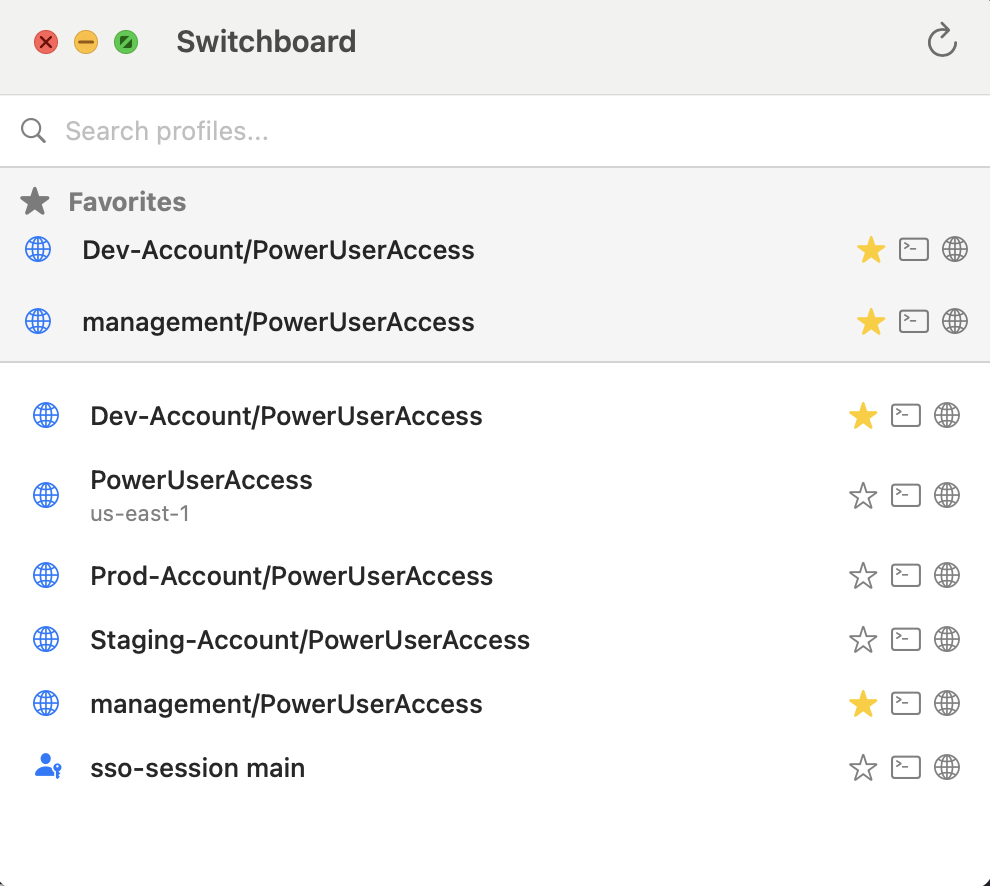
I also added the ability to set favorites (my most used feature) for frequently accessed profiles.
The app is written in native SwiftUI, doesn't require Xcode, and can be installed from homebrew or directly from source.
What I learned about SwiftUI
This was my first real SwiftUI project, and I was pleasantly surprised by the developer experience.
A few things that stood out:
You don't need Xcode. For simple apps, you can write SwiftUI in any editor and build with swift build from the command line. This was a game-changer for me - I used VS Code the entire time.
Menu bar apps are straightforward. SwiftUI has a MenuBarExtra view that handles most of the heavy lifting. Defining the menu structure is declarative and intuitive once you get the hang of it.
State management clicks quickly. Coming from React, the @State and @StateObject patterns felt familiar. SwiftUI's approach to reactivity is clean and doesn't require a lot of boilerplate.
Shelling out to external commands is simple. Running granted under the hood just required using Process() to spawn commands - no complex bridging or FFI needed.
The main gotcha I ran into was around app signing and distribution. Getting the app notarized for Homebrew distribution took some trial and error, but the Homebrew documentation was helpful.
Overall, SwiftUI feels like a solid choice for building lightweight macOS utilities. I'll definitely be using it again.
Check it out
Check out the tool here and let me know what you think! Contributions are always welcome.